14 Jun 2024

Take of the best projects


Projects                           Author                        Topic

project 5                             Me                                       gimp, layer
picture elements                 Lucía                                   digital images, gimp, layer
digital image                       Me                                      digital image, map, mind
gimp 6: final project           Marina                                digital image, gimp, mosaic, portrait
exercise 1 gimp                   Me                                      activities, blog, gimp
ercilla museum                   Santiago N.                        digital image, gimp, layer
scientific poster                   Me                                     digital, kinetic, static, poster

4 Jun 2024

Scientific project

We had choose a good template to put all the information of the 2 experiments we had made before.
We included  our opinion and some conclusions.


15 May 2024

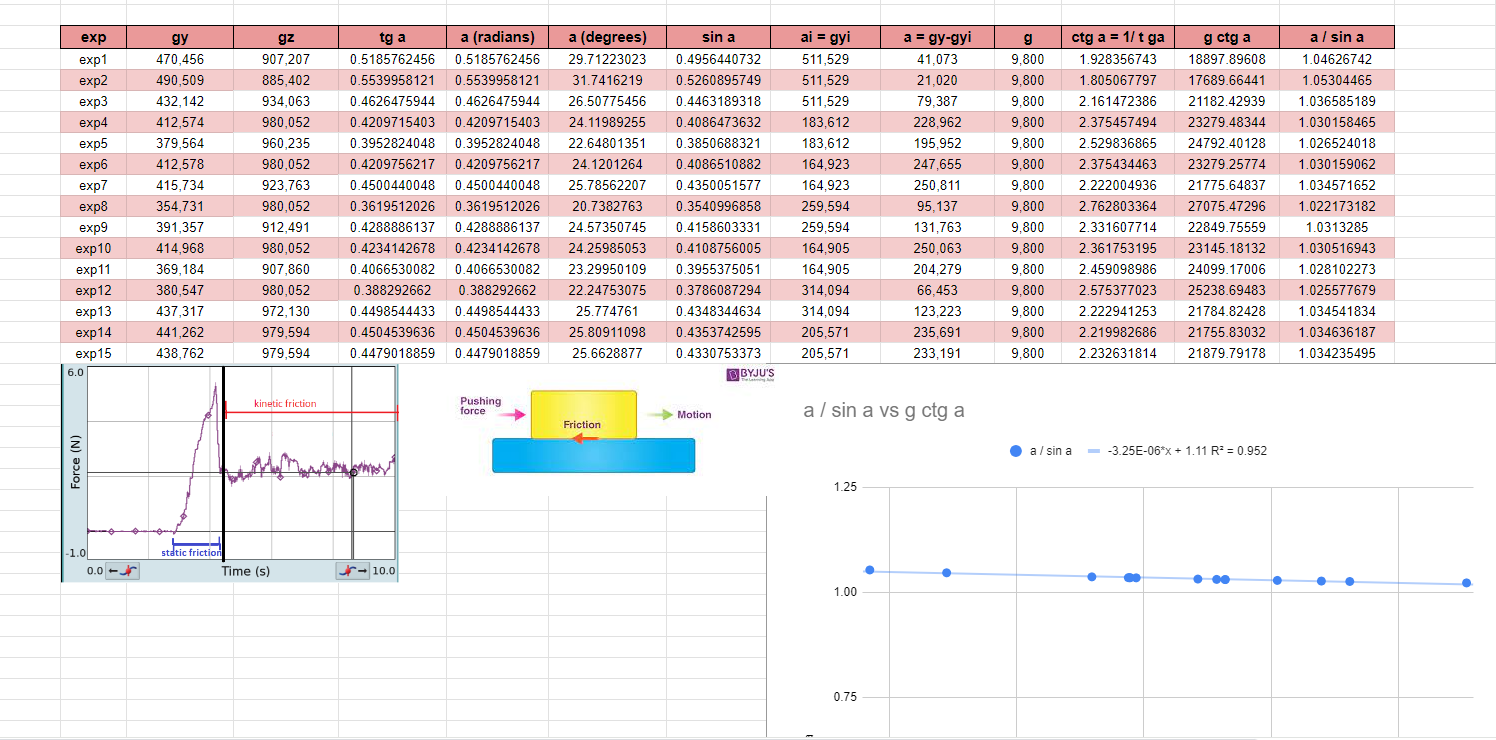
Kinetic coefficient

We put the phone in a platform with different degrees to make it slide. Then, we put all the calculations in an excel and we put all the data and the calculations.

Lastly, I made a chart with the data of the two last columns and I add the equation of this chart.


29 Apr 2024

Static coefficient

 To make this calculations we had to put the phone in a platform and incline it. 

We use phyphox to know the grades when the phone is static. Then, we put all the information in excel and we make the calculations.


19 Apr 2024

Angles phyphox

I used phyphox and I put my phone with different angles with a ruler to know gy and gz. Then, in an excel I put the data and the calculations.


7 Feb 2024

Project 5

 I uploaded in gimp a photo with a good quality, then, I choose the parts that I wanted to highlight and with the scissors I aparted them in a different layer. I delette the rest and then I changed the color of the first layer to make it black and white.

Lastly, I put a name fot the photo and my name with the color of the parts that I highlighted.


2 Feb 2024

Project 4

 First, I download the works of art and then I put them in different places.

To make it realistic I removed some parts and I reduced the opacity of the pictures.

And the las thing I did was to include the text "museum" and I reduce the opacity and change the perspective.

And I include my name.


23 Jan 2024

Project 3

 I included 3 photos of flamingos and I remove the background to make it realistic, then I moved them in different places.

I removed the sky with the fuzzy select tool and I put another sky in instead. Finally, I put my name in a corner


17 Jan 2024

Exercise 70 gimp

I chose a landscape for the background and then I put the images of the animals like layers.

I included two ducks and one bear and I erased the background of their photos with the rubber and then with a rubber more soft I trazed the borders of the animals.

Lastly, I put then in different places and I included my name


16 Jan 2024

Exercise 69 gimp

 First, I drew a blue circle with a brush and white background, and then I created 3 transparent to make each figure, the triangle, the rectangle and for the strips I only made small rectangles.

Then, I removed the background and I duplicate, rotate and change the position of the layers to make good designs


10 Jan 2024

Exercise 1 gimp

 I change the inclination and rotation of the original photo to improve it, and then I crop it.

One requirement was to remove something, so I remove the boy who was sitting in the stairs and then I fix the background repiting the patron of the stairs.


13 Nov 2023

Digital image activities

 ♣ 41.- Think you want to print out a photograph with a size of DIN A4: 210 × 297 mm

maintaining a printing quality of 200 dpi. Which resolution would the image need?

210 mm x 1 inch ➗ 254 mm = 0,82 inches

297 mm x 1 inch ➗ 254 mm = 1,16 inches


0,82 x 200 = 164 inches

1,16 x 200 = 232 inches


• Resolution: 164x232 inches


♣ 42.- Which resolution would the same picture need to have a 300 dpi picture?

210 mm x 1 inch ➗ 254 mm = 0,82 inches

297 mm x 1 inch ➗ 254 mm = 1,16 inches


0,82 x 300 = 246 inches

1,16 x 300 = 348 inches


• Resolution: 246x348 inches

18 Oct 2023

Situation 2

"I like online games and spend all my spare time playing on the computer and phone. I even prefer playing over going out with family or friends. My parents are all time telling me to organize better my time but I think it is my hobby and does no harm on me…. What do you think and why…."


GAMES ADDICTION

It's good to play games and entretain yourself but you have to know when to stop. It's not healthy play games all day, you can produce an addiction that is going to make you play without a break. You have to go out with your friends and family or make a sport, you have to socialise and don't  be in front of a screen many  hours. You can't let go your responsabilities.

Play games is something good but you  have  to organise your time and dedicate time for your family and friends

Video game addiction is defined as the steady and repetitive use of the Internet to play games frequently with different gamers, potentially leading to negative consequences in many aspects of life


Links about this problem:


Tips to avoid this problem:

Tip 1: You can put alarms to know when to stop, for example you can put an alarm every 2 hours with breaks of one hour

Tip 2: You can get into a sport or a extracolar activity, so you will have to organise your time

Tip 3: You can make a schedule, for example, the mondays, wednesdays and fridays you can play but the rest of the days no

Tip 4: You can use it like a recompensation, if you get a good grade or you do something good you will play

Tip 5: Every day you are going to do your obligations and important things and when you finish you can play


What do you think is the most useful tip?
Vote in here


Results:
                                                                                      

17 Oct 2023

Situation 1

"I use always the same password for all my accounts and applications. I do not like to use complicated passwords because it is difficult to remember and too long. What do you think?.... "


MAKE A WEAK PASSWORD 

This happen when you don't are concious of that a person can know all your private information knowing your password. 
You have to do different and complicated passwords for all your accounts and applications, trying long passwords with numbers and symbols.
If you make a weak password a person can steal all of your information and information of your family or friends too.
A weak password is short, common, a system default, or something that could be rapidly guessed by executing a brute force attack using a subset of all possible passwords, such as words in the dictionary, proper names, words based on the user name or common variations on these themes, and a strong password is: At least 12 characters long but 14 or more is better. A combination of uppercase letters, lowercase letters, numbers, and symbols.


Links about this problem:


Tips to avoid this problem:

Tip 1: First, if you don't have good memory, you can write all your passwords in a paper or you can also write them in your phone 

Tip 2: You can create a password that is easy to remember, but you have to change letters for numbers

Tip 3: To make your password more secure you can write a phrase instead of a word to make it longer and difficult to resolve

Tip 4: You can also put acronyms in your password 

Tip 5: You have many symbols in your keyboard put as many as you want, don't forget them. 


What do you think is the most useful tip?
Vote in here


Results:


29 Sept 2023

What do you need to make a computer?

 Building a computer may seem complicated, so here are some of the main components to make a computer and it works:

- Motherboard

- CPU

- RAM

- GPU

- SSD

- PSU

- Case

- OS


8. Operating System

When you build a PC, you don't automatically have Windows included. You'll have to buy a license from Microsoft or another vendor and make a USB key to install it.

Of course, you will need to install the OS onto your Computer, and there are several ways to do this. You can use a Win OS Install DVD if you have one and your PC has a DVD Drive.


Nowadays, though, as optical drives are becoming a thing of the past, the Operating System is usually either downloaded directly from the Internet (for you to create your own boot medium on DVD or thumb drive), or you can buy it on a USB Stick (Thumb-Drive). 


Where you can buy it:

https://www.g2a.com/es/category/operating-system-c3381

https://www.bestbuy.com/site/software-games/operating-systems/abcat0508001.c?id=abcat0508001

https://www.buy-keys.com/productcategory/software/operating-system/


Video:


The most expensive OS can cost $199,000


7. Case

The Computer case is nothing more than a fancy-looking box that holds all of the PC’s components. It can be opened and closed and has pre-defined areas with screws and holes where all of the components are supposed to be placed and attached to.


PC Cases come in different colors, and sizes, with or without fans; some have RGB lights, some don’t and some have glass side panels


Webs where you can buy it:

https://www.newegg.com/Computer-Cases/Category/ID-9

https://www.bestbuy.com/site/computer-cards-components/computer-cases-drive-enclosures/abcat0507006.c?id=abcat0507006


How to install it:

https://www.digitaltrends.com/computing/how-to-build-a-pc/


Example of a computer case:


You should pay around $100 and $150

Take of the best projects

  Projects                           Author                        Topic ...